We use cookies to improve the services we offer you. By continuing to browse this site, you consent to keep them in accordance with our Privacy Policy.
×We use cookies to improve the services we offer you. By continuing to browse this site, you consent to keep them in accordance with our Privacy Policy.
×
 1
1
 8 min
8 min

TL;DR
You finished the edit. Now five people need to watch it and tell you what to change — and at least one of them is going to reply with “looks good, just fix the part near the beginning.”
Video review and annotation software exists to fix exactly that problem. Instead of feedback scattered across email, Slack, and shared drives, reviewers leave time-stamped comments directly on the video, frame by frame. Editors see exactly what needs to change and where, without playing detective first.
Below are the 10 best video review and annotation tools for 2026, based on hands-on use across real production workflows — we tested each one for frame-accurate commenting, reviewer access, and how well it fits into standard editing pipelines.
Before comparing tools, it helps to know what actually separates a good video review platform from a glorified file-sharing link:
With those criteria in mind, here’s how the major players stack up.
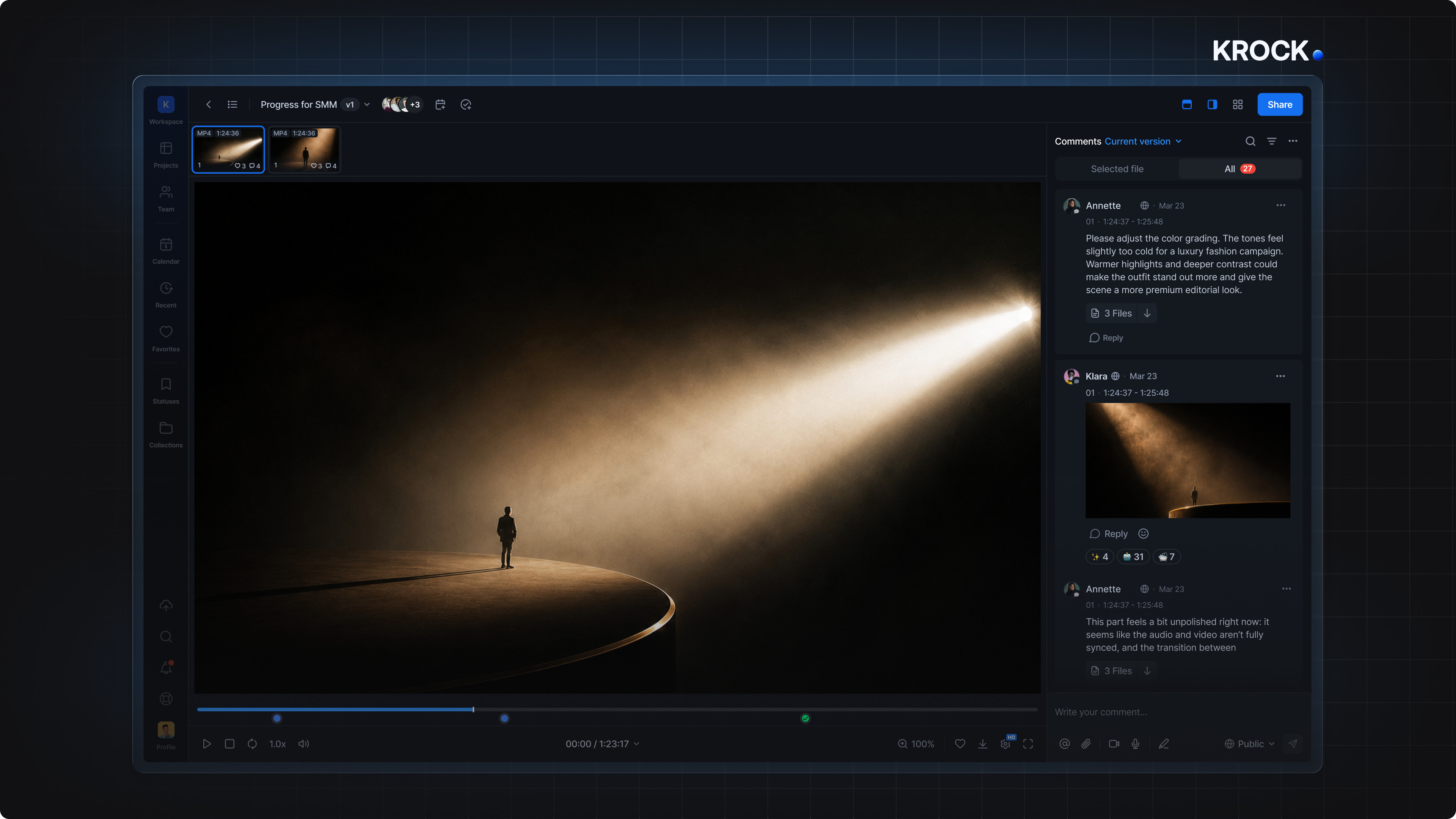
Krock.io is a video review software that built around frame-accurate video review — reviewers click the exact frame they’re talking about and leave a comment that stays pinned there, even as new versions are uploaded. It supports video, images, audio, and PDFs in one workspace, and every plan includes unlimited reviewers, so inviting a client’s entire team doesn’t add to your bill.
Best for: Freelancers, agencies, and studios that want a full review-and-approval workflow without per-seat pricing.
Standout feature: Unlimited reviewers on every plan, plus production-stage tracking (draft → internal review → client review → approved).
Frame.io, now part of Adobe, is one of the most established names in video review. It integrates tightly with Premiere and After Effects, letting reviewers comment without leaving the timeline.
Best for: Teams already deep in the Adobe Creative Cloud ecosystem.
Standout feature: Native Premiere panel for in-app commenting.
Wipster focuses on simple, fast review links — upload a cut, send a link, and collect time-stamped feedback. It’s straightforward but can get expensive as reviewer counts grow.
Best for: Small teams that mainly need quick external sign-off.
Standout feature: Clean, minimal review interface that’s easy for non-technical clients.
Ziflow leans toward marketing and creative proofing beyond just video — think print, digital ads, and motion together. Approval workflows can be configured with multiple stages and stakeholders.
Best for: Marketing teams managing video alongside other creative assets.
Standout feature: Multi-stage, role-based approval routing.
Filestage offers structured review workflows with defined approval stages and deadlines, aimed at teams that need a clear audit trail of who approved what and when.
Best for: Agencies managing multiple clients with formal sign-off requirements.
Standout feature: Deadline tracking with automatic reminders to reviewers.
GoVisually is a budget-friendly proofing tool that covers video, images, and documents. It’s lighter on advanced video features but works well for smaller teams reviewing mixed media.
Best for: Small businesses reviewing a mix of video and static creative.
Standout feature: Affordable entry pricing for mixed-media review.
ReviewStudio supports video, audio, and document review with markup tools and version tracking, positioned as a mid-market alternative to the bigger platforms.
Best for: Teams that need document and audio review alongside video.
Standout feature: Side-by-side version comparison view.
If you already host your videos on Vimeo, Review Pages add basic time-stamped commenting on top of your existing player — no separate tool needed.
Best for: Creators already paying for Vimeo Pro or higher who want review without another subscription.
Standout feature: Built directly into a video host you may already use.
Dropbox Replay brings frame-accurate review to files stored in Dropbox, which is useful if your team already lives in Dropbox folders for asset storage.
Best for: Teams whose existing file storage is Dropbox.
Standout feature: Review happens right where your footage already lives.
These lighter-weight tools focus on quick annotation — drawing, pinning comments, and sharing feedback fast — without the full project-management layer of larger platforms.
Best for: Quick, informal feedback rounds on short clips.
Standout feature: Low learning curve, fast to set up for a single review round.
| Tool | Best For | Unlimited Reviewers | Editor Integrations |
| Krock.io | Full review & approval workflow | Yes | Adobe, DaVinci Resolve, Final Cut Pro |
| Frame.io | Adobe-based teams | No (paid seats) | Premiere, After Effects |
| Wipster | Quick external sign-off | No (paid seats) | Premiere |
| Ziflow | Marketing + creative proofing | Limited | Limited |
| Filestage | Formal approval chains | No (paid seats) | Limited |
| GoVisually | Mixed-media review on a budget | Limited | Limited |
| ReviewStudio | Document + audio + video | Limited | Limited |
| Vimeo Review Pages | Existing Vimeo users | No (paid seats) | Vimeo only |
| Dropbox Replay | Dropbox-based storage | Limited | Limited |
| Markup.io / Cageapp | Fast informal feedback | Limited | Limited |
If your biggest pain point is clients commenting in five different places, prioritize frame-accurate commenting and no-login review links — that’s the core fix.
If your team is growing and your client roster keeps expanding, pay close attention to per-seat pricing. Tools that charge per reviewer can get expensive fast once you’re managing several client accounts at once.
If you’re already locked into an editing ecosystem (Adobe, Vimeo, Dropbox), a tool that integrates directly with what you already use will have the shortest setup time.
If you’re not ready for a dedicated platform and still sharing clips for occasional one-off projects, compressing and sending video by email is a lighter option — though the lack of frame-accurate timestamps will slow feedback loops on anything complex.
Video annotation software lets reviewers leave comments, drawings, or markups pinned to a specific frame or timestamp in a video. Instead of describing where in the video an issue occurs, reviewers click directly on that moment, and editors see exactly what to fix.
Most tools on this list offer a free trial or a limited free tier, typically capped by storage, number of projects, or reviewer seats. Krock.io, Wipster, and GoVisually all offer free starting tiers suitable for testing with a small project.
No — the tools above are built so clients can open a review link and start commenting without signing up. This is one of the biggest time-savers compared to email-based feedback, since there’s no setup friction for external reviewers.
No. Video review tools work alongside your editing software (Premiere, DaVinci Resolve, Final Cut Pro, or Movavi Video Editor) — you still edit in your usual program, then upload the export for review and feedback before finalizing. If your video also needs captions, add subtitles before uploading so reviewers can sign off on the final version in one pass.
For most creative teams, Krock.io is the strongest overall pick because it combines frame-accurate review, unlimited reviewers, and a full production-stage workflow without per-seat pricing creeping up as your client list grows. If you’re deeply embedded in Adobe’s ecosystem already, Frame.io is worth a look — but for teams that want one tool to handle review from rough cut to final sign-off, Krock.io covers the most ground.