We use cookies to improve the services we offer you. By continuing to browse this site, you consent to keep them in accordance with our Privacy Policy.
×We use cookies to improve the services we offer you. By continuing to browse this site, you consent to keep them in accordance with our Privacy Policy.
×
 1
1
 9 min
9 min

Most small businesses run two or three video ads, get weak results, and decide video ads don’t work for them.
In most cases they stopped too early. Three ads are too few to find one that works.
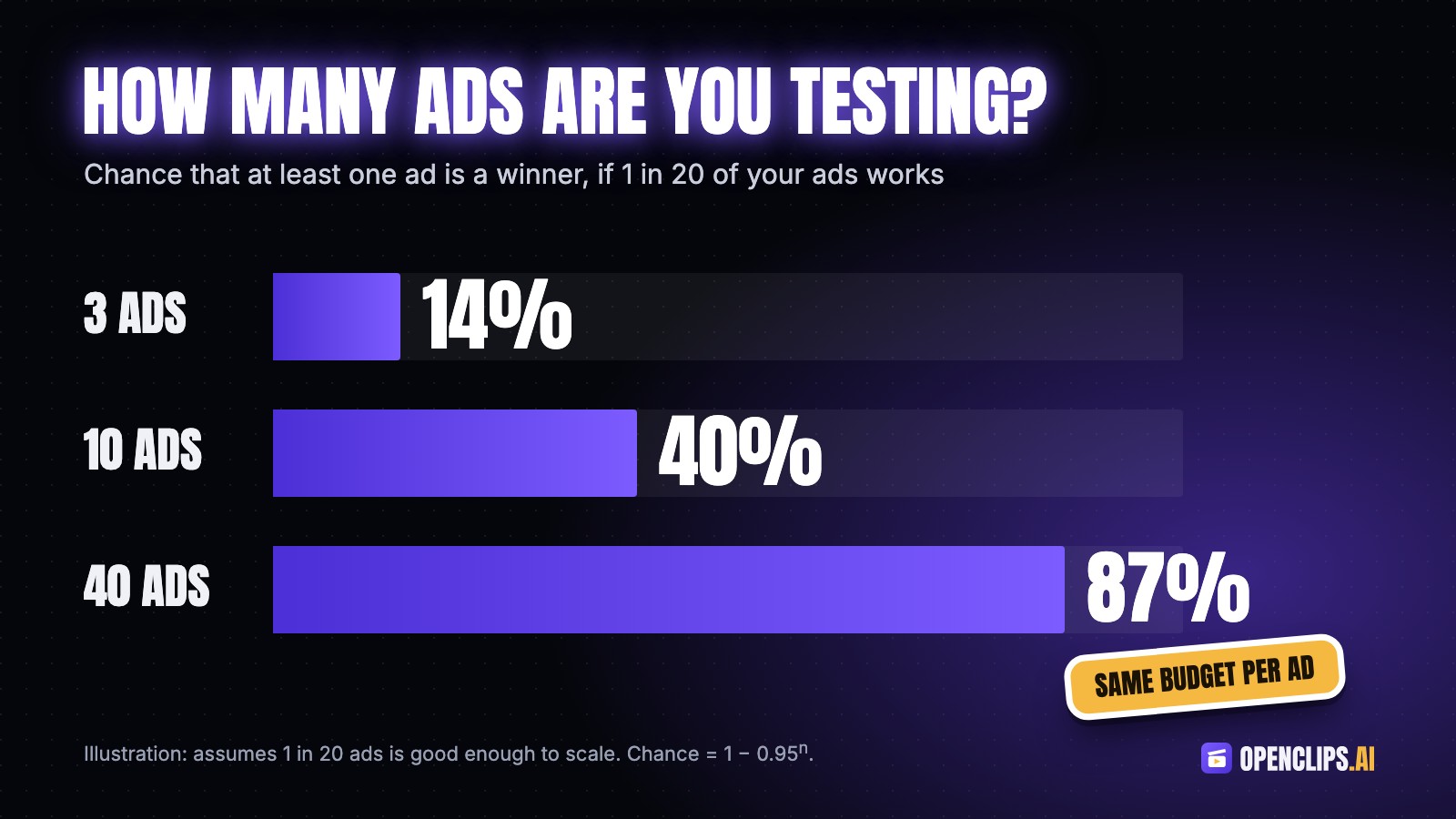
Say 1 in 20 of your ads turns out good enough to scale. If you run 3 ads, the chance that one of them is that ad is about 14%. With 10 ads it’s 40%. With 40 ads it’s 87%. Nothing else changed: same product, same audience, same budget per ad. You just gave yourself more tries.
The team behind OpenClips has spent more than a decade running paid ads, and this pattern shows up in campaign after campaign. Getting ads in front of people keeps getting easier. Making enough of them doesn’t. A campaign often needs around forty creatives before one of them works, and most teams can produce four.
OpenClips, an AI video platform, was built to fix that part of the job.
Creative matters more than most people think. A Nielsen review of about 500 campaigns found that 47% of the sales lift from advertising came from the creative itself, more than from reach or targeting.
The hard part is that you can’t tell in advance which creative will work. People who review ads for a living get it wrong too. The one the team likes most in the review meeting often loses. Meta now pushes advertisers to vary their creative, because its delivery system uses the differences between your ads to decide who sees them. Jon Loomer has a good breakdown of how that works.
So you need volume. The problem is what volume costs when you hire it out. According to Billo’s 2026 breakdown of UGC rates, entry-level creators charge $50 to $100 per video and mid-level creators $150 to $500, and usage rights for paid ads can double or triple that. Forty mid-level videos at $150 each comes to $6,000 before rights, before you ship product to anyone, and before the back-and-forth on revisions.
Most small businesses can’t spend that on a test, so they make three ads and hope.
Each one removes a specific reason making ads takes so long. You can start with any of them.
Most teams start a new ad by writing a script and a shot list. That means a brief, a meeting, a draft and another meeting before anything gets made.
Skip that. You already have what a first batch needs: your product page, a few decent photos, and one sentence about who buys it.
In OpenClips Marketing Studio you paste a product link, upload a photo or type a few words, and it suggests AI ad templates that match the product: UGC-style videos, cinematic product shots, explainers, before-and-after clips. You don’t need to learn prompt writing to get a usable ad out of it.
When people hear they should test 40 ads, they think they need 40 ideas. They need 8 formats and 5 hooks. Put every hook on every format and you have 40 ads.
A format is a proven structure for an ad, like a before-and-after or an unboxing. You take it as it is and put your product into it. These eight work for most physical products:
For more, you can always explore TikTok ideas for your brand.
A hook is the first sentence or the first two seconds of the ad. It decides whether people keep watching, so that’s where most of your effort should go.
The best hooks come from your customers. Open your reviews and support emails and copy the exact words people use. Say you sell sunglasses, and your reviews keep mentioning lost pairs, glare on the water and kids breaking them. Your five hooks could be:
The hooks test what people care about. The formats test how they want to see it. Together you get 40 ads that each test something different.
A common mistake is choosing one AI video tool and using it for everything. When it fails at something it was never good at, people decide AI video doesn’t work.
Different models are good at different jobs. A few examples:
OpenClips has 77 image and video models in one account and one library, so you can switch models between shots without signing up for anything new. Whatever tool you use, choose the model based on the shot you need.
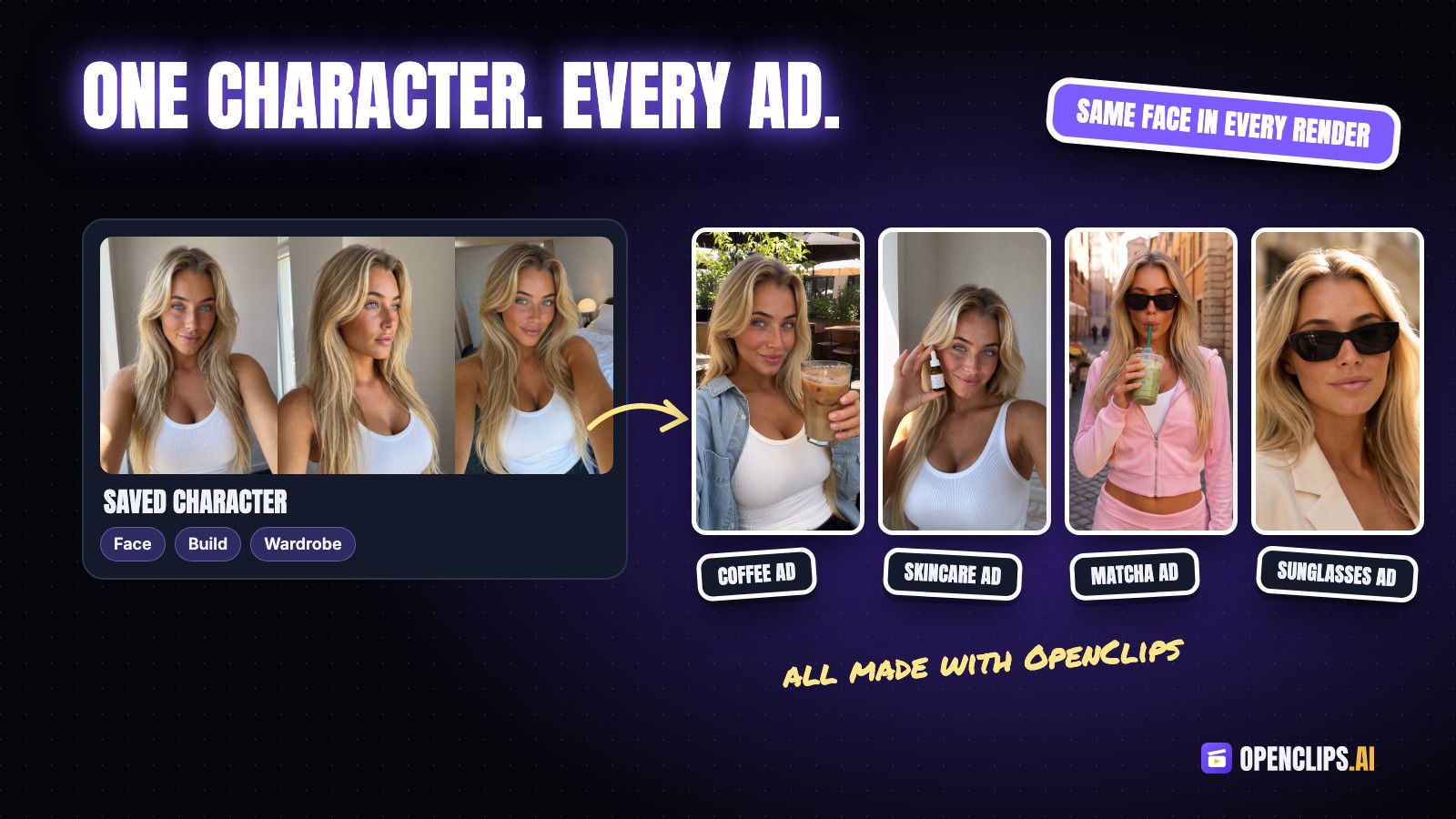
AI is good at making one nice clip. It’s much worse at showing the same person with the same product in ad after ad. Faces change slightly between renders, logos shift, and product details come out different. People notice, and the ad looks cheap.
Set your references before you start the batch: the same product photos and the same presenter in every render, rather than describing them again in every prompt.
In OpenClips you can save a character with a fixed face, build and wardrobe, use it across shots, and attach the same product photos to every render. If a tool you’re testing can’t take reference images, your ads will look like they came from different brands.
Creators still have a place. A good creator telling a real story will usually beat a template. Use AI to find the angle that works, then hire the creator to make the best version of it.
When a batch does badly, most teams throw it out and start over with a new concept and a new script. Two weeks later they still don’t know what went wrong, because they changed everything at once.
Do this instead:
If a new round takes you a day instead of two weeks, you get many more chances to learn what your customers respond to.
Before anything goes live, do two more things. Add captions, because most feeds start videos on mute. Then export every size you need: 9:16 for Reels, TikTok and Stories, 4:5 or 1:1 for feeds, and 16:9 for YouTube. Stories often need their own version, and comparing a few Instagram Story ideas can make those distinctions clearer.
A few things AI still doesn’t do well:
If you want to try this on OpenClips, Movavi readers get 10% off the first month of any monthly plan with the code MOVAVI (one time use per account).
Nobody can tell you in advance which ad will work. What you control is how many ads you test and how fast you learn from them.
A production team used to be the only way to make enough ads, and most small businesses couldn’t afford one. Now you can start from a product page, test dozens of ads in a week, and spend real money only on the ones that work.
Pick one product today, write five hooks from your reviews tonight, and make the ads tomorrow. A week from now you’ll be deciding based on numbers instead of opinions.